Instance
Modules
A TrakHound Instance is the ASP.NET Core and Blazor host that loads Packages, exposes HTTP endpoints, and serves the admin UI. Each Package has a category that defines the kind of module it provides, so each part of a project can be developed, versioned, and deployed on its own.
- APIs - Controller-style HTTP APIs mounted at a configurable route, supporting GET, PUT, POST, and DELETE requests, streaming responses over WebSockets or Server-Sent Events, and endpoints served as MCP Tools
- Apps - Blazor user interfaces hosted within the Instance
- Functions - Units of code that run on demand, with Jobs (named sets of Parameters), or on a CRON schedule from the Schedule Board
- Workers - Long-running background processes
- Services - Backing providers for data such as Blobs, Key-Values, Messages, Message Queues, Tables, and Time Series
- Identity - Authentication providers (OpenID Connect, LDAP, tokens, and built-in API keys) that secure Instance resources
Packages are also given Volumes, scoped storage areas for their files and configuration.
InstancePackages
Every module is distributed as an installable Package, which keeps projects organized and makes deployments repeatable. Packages are published to a package server and installed on any number of TrakHound Instances.
- Each Package is described by a
trakhound.package.jsonmanifest with its ID, Category, and Metadata (such as publisher, description, and default route) - Hot loading: Instances watch for Package changes and load new versions without restarting
- Package dependencies, including minimum versions, are resolved and installed automatically
- See available updates, and revert to a previous version in one click
- Install a new version on a test Instance where process engineers can try it, then install the same Package in production
- Self-host a Package source on your own Instance so engineers across the organization can publish and install internal Packages
- Create, pack, publish, and install Packages and Deployments with the TrakHound CLI (
th), from Visual Studio, or from the Packages App - Publish to the next version automatically, with shared publish destinations for every project in a repository
- First-party Packages for package management, Functions, Scheduled Tasks, an API Explorer, and a Welcome page for development Instances
- Sign Packages and check them on install: every Package records its files, commit, and NuGet dependencies, and an Instance can refuse anything not signed by a trusted publisher, or not approved by a TrakHound PackageManager
- Example Packages show an API, App, Function, and Worker working together
- License commercial Packages with signed License Codes that are checked offline, with nothing contacting the publisher
th packages dotnet --publishServices & Routing
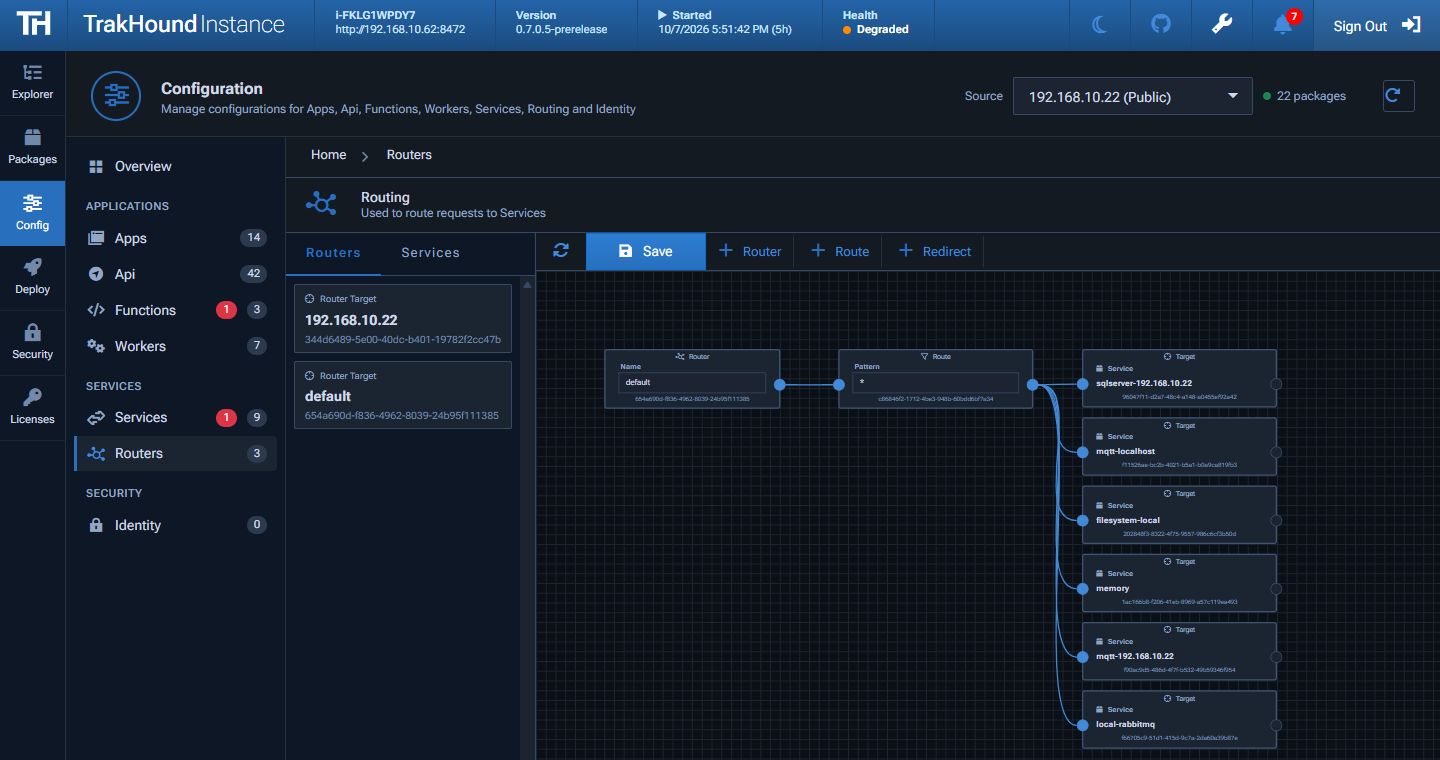
Modules read and write data through common service interfaces, and Routers map each request to one or more Services. Routing is configured per Instance from the admin UI's routing diagram, so storage and messaging can change without changing application code.
- Data primitives for Blobs, Key-Values, Messages, Message Queues, Tables, and Time Series
- Table Requests that run on SQL Server, PostgreSQL, or SQLite, so a module doesn't need to know which database answers
- Free Service Packages for SQL Server, PostgreSQL, SQLite, Redis, MQTT, RabbitMQ, TimescaleDB, InfluxDB 3, the File System, and Memory
- An HTTP Service Package to use the Services of another TrakHound Instance
- Routers that try each Route's Services in order, falling back to the next when one doesn't have the data or is down
- Publish streams for sending many Messages over one connection
- Security profiles control which users can read and write each Service
- Connection details and credentials are set in Service configurations by IT, so modules never need to know them
- Run on premise, in the cloud, or both
Admin UI
Every TrakHound Instance includes a browser-based admin UI for configuring, monitoring, and troubleshooting everything running on it. Engineers can install Packages, configure modules, and see what is happening inside an Instance without logging in to the server.
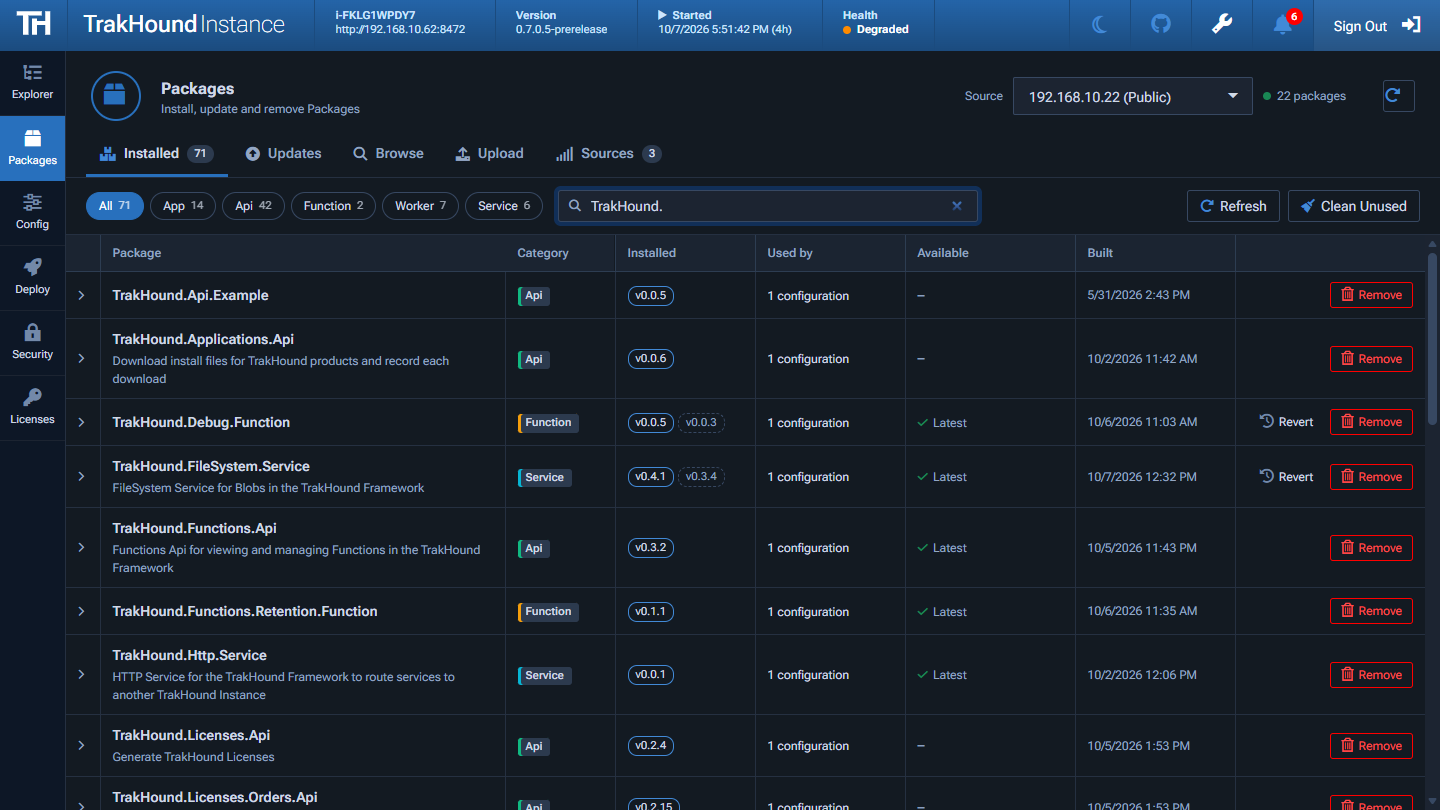
- Packages - Browse, install, upload, update, and revert Packages from configured sources
- Configuration - Configure Apps, APIs, Workers, Functions, Services, and Identity modules, with Configuration Variables shared by every configuration
- Routers - Visual diagram of Routers, Routes, and the fallback order of the Services each request is sent to
- Explorer - Run API endpoints, preview App pages, and browse Tables, Key-Values, Blobs, and Messages
- Functions & Scheduling - Run Functions with Jobs, schedule them by drag and drop on the Schedule Board, and see run metrics for every Scheduled Task
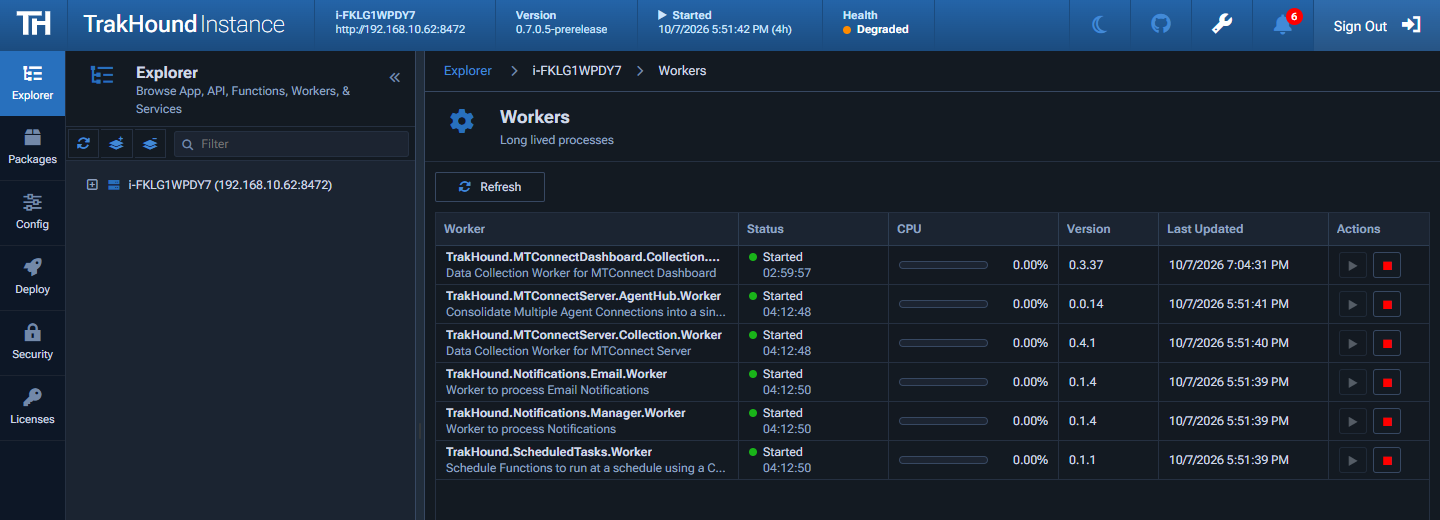
- Workers - Start, stop, and monitor Workers
- CPU by Module - See the CPU used by every Worker, Function, API, and App on the Instance
- Apps & Connections - See every open App page and the version it is running, and Identify, Notify, Reload, or send a Message to individual pages
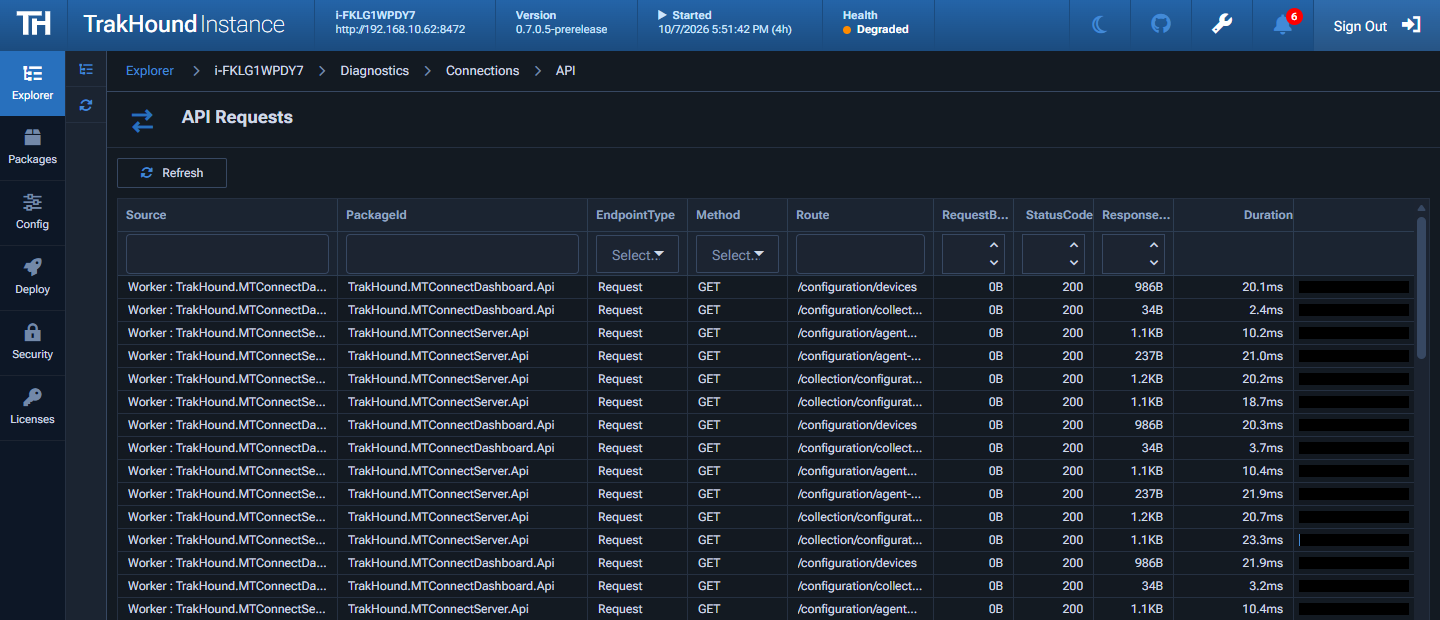
- Diagnostics - View health checks, loaded modules, logs, App page connections, and recent HTTP and API requests with the error and Request ID of failed ones, and close any open API Stream
- Deployments - Copy an Instance's Packages and configuration, or only some configuration categories, to other Instances, or set up other Instances and devices in Workspaces, with a Deployment and licenses for each device
- Security - Manage security profiles, Users, API keys, OpenID Connect and LDAP providers, and Zones, and check what is public
- Admin Accounts - Give each person their own admin account with roles such as Packages, Security Operator, or Viewer, or your own roles, optionally limited to Zones
- Licenses & Settings - View installed licenses, and change ports, trusted proxies, the addresses allowed to use the admin UI, Rate Limits, logs, and metrics
Metrics & Diagnostics
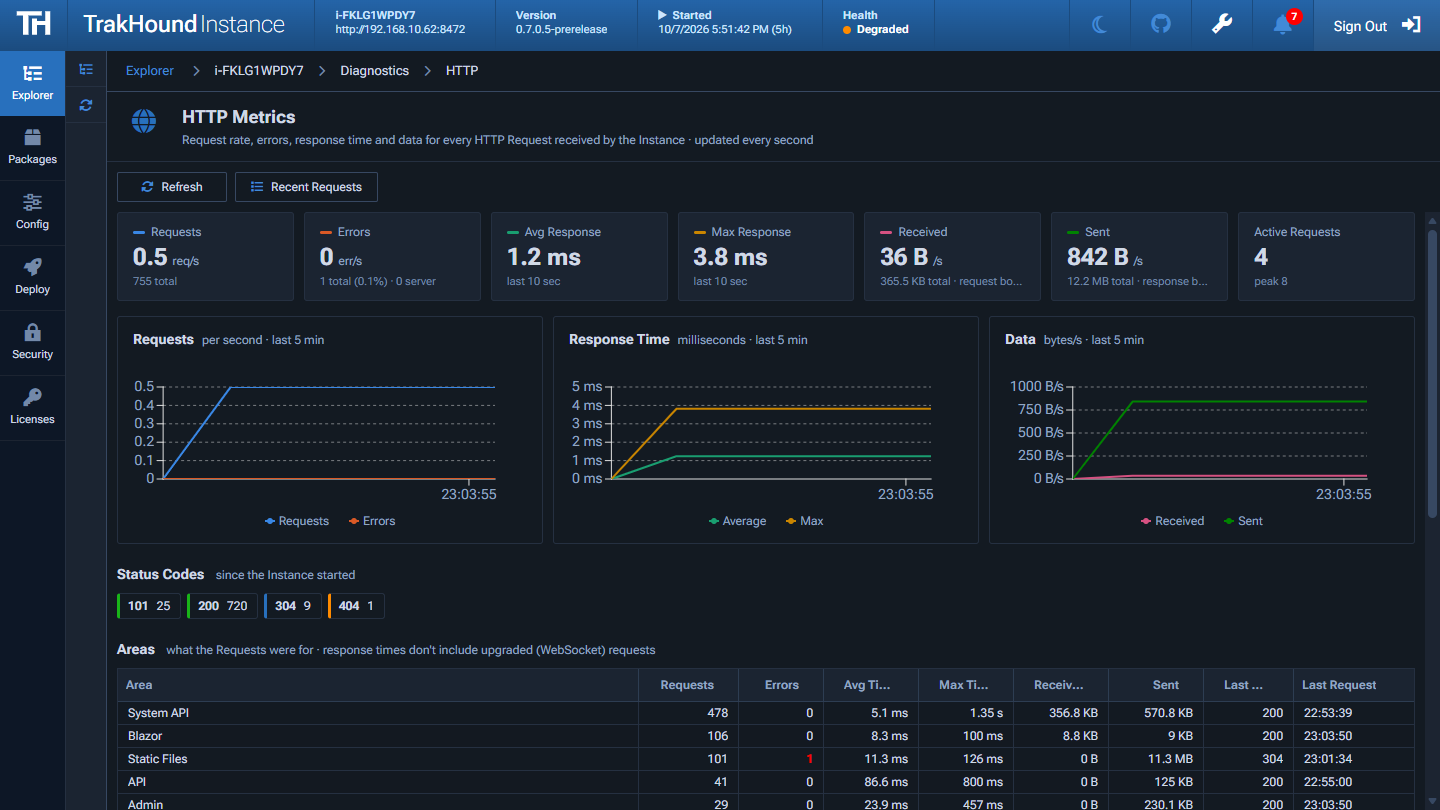
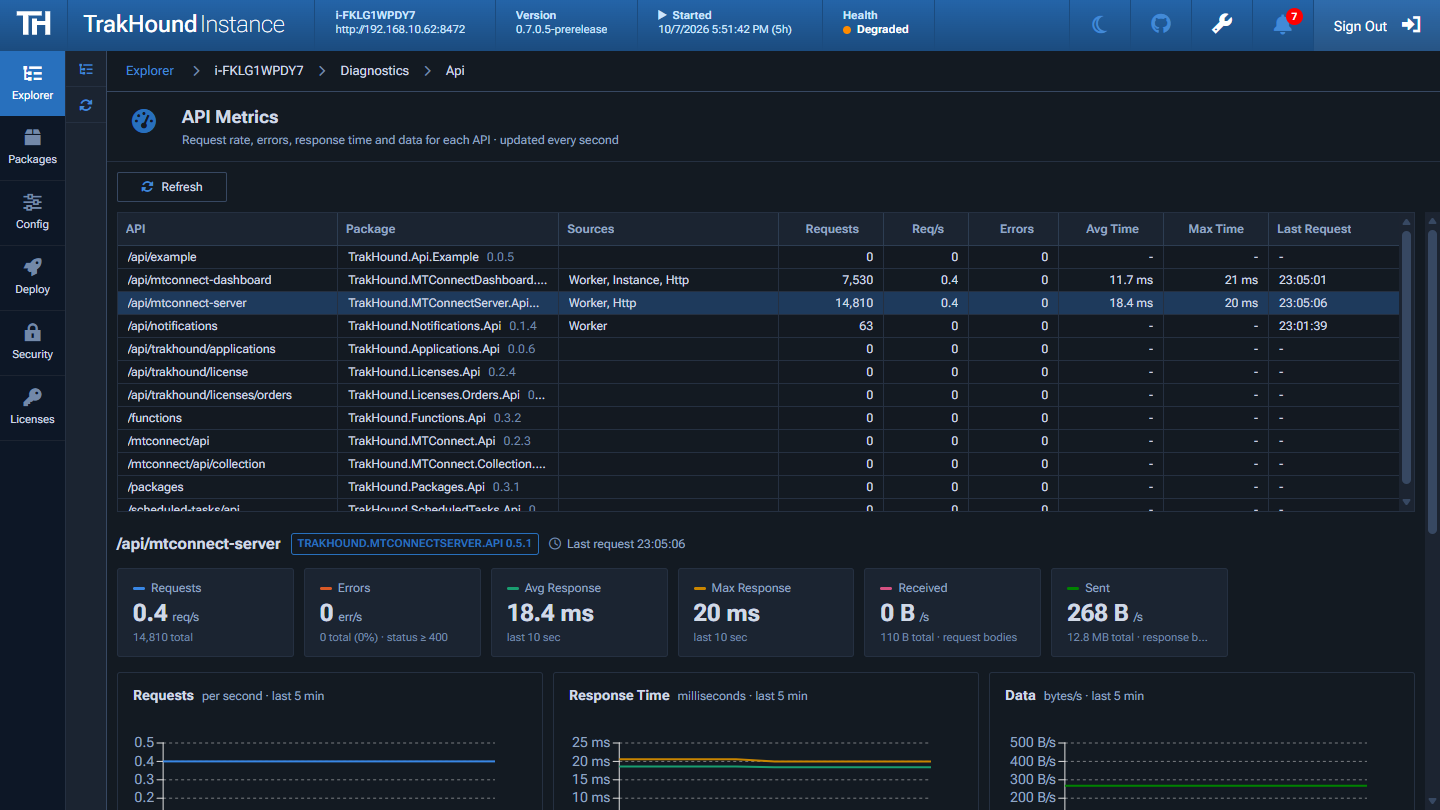
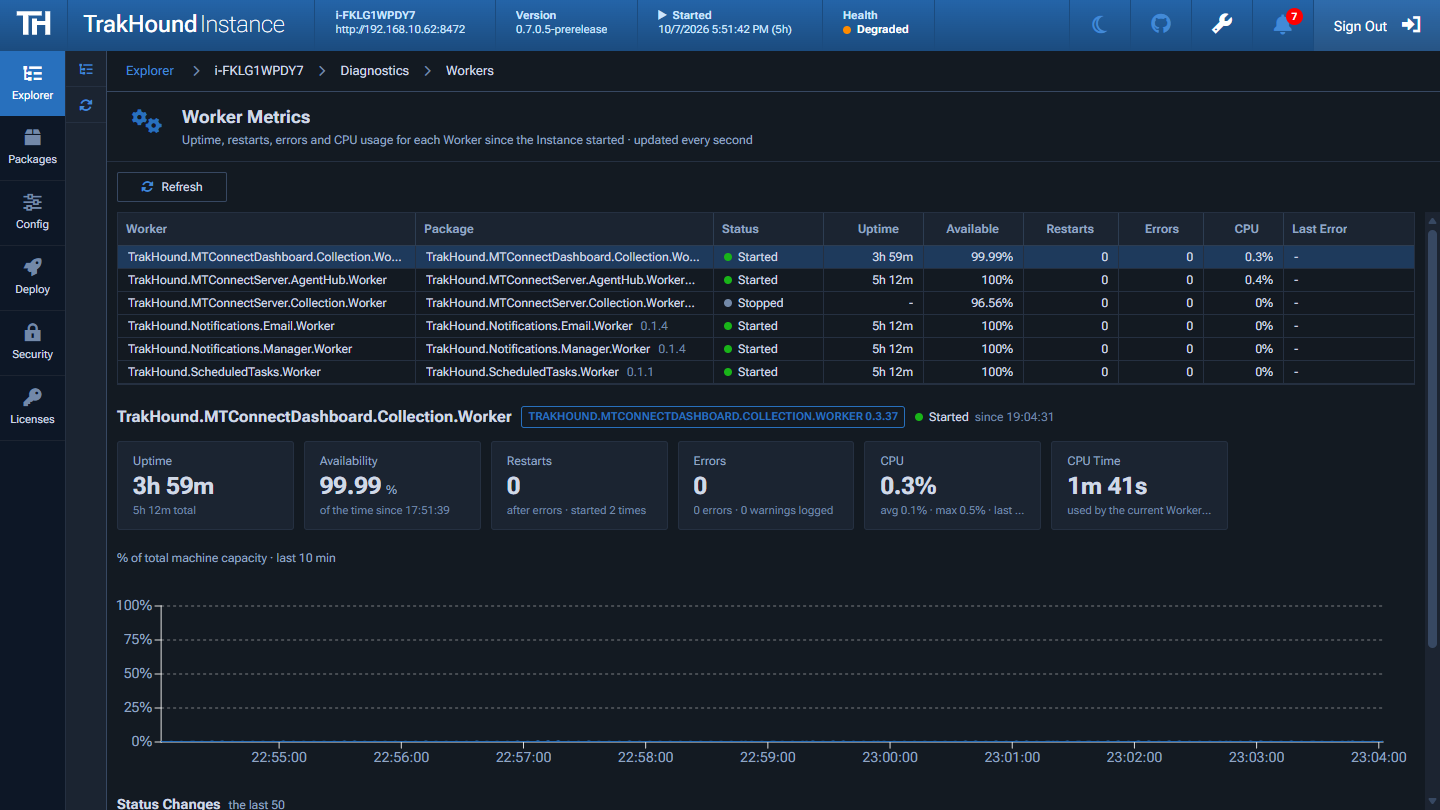
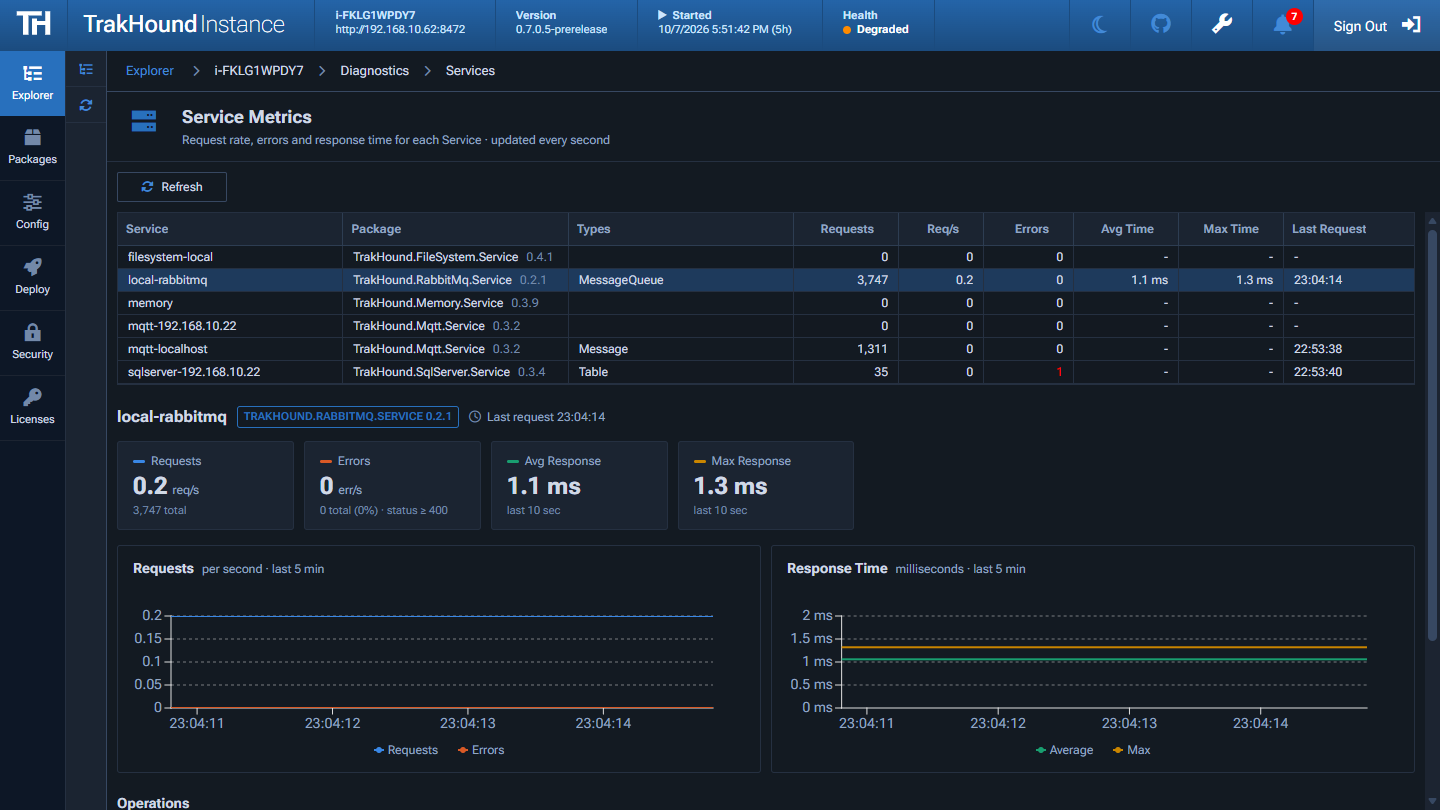
Every Instance includes live metrics pages, updated every second, so engineers and IT can see how each part of a system is performing and find the cause of a problem without adding monitoring tools.
- CPU by Module - The CPU used by each Worker, Function, API, and App, with a 10 minute chart, so you can see which module is using the server
- HTTP - Request rate, errors, response time, and data for every HTTP request, with status codes and what each request was for
- APIs - Requests, errors, and response times for each API, and where the requests came from
- Workers - Uptime, availability, restarts, errors, and CPU usage for each Worker
- Services - Request rate, errors, and response time for each Service and its operations
- Functions - Runs, results, durations, and CPU usage for each Function
- Apps - Page views and time on page for each App and client connection
- Streams - Open connections, messages, data, and errors for WebSocket and Server-Sent Events streams, plus every API Stream opened inside the Instance, with idle Streams highlighted
- Recent Requests - The latest HTTP and API requests, filtered by status, source, or duration, with the error and Request ID of each failed request
- MCP - Tool calls, errors, denied calls, durations, and the AI clients that connected
- Health - The overall health of the Instance, with checks for Services, Resources, Disk, Packages, and Workers every 10 seconds
Non-Disruptive Updates
App pages often stay open all day on terminals, displays, and operator stations. When a new version of an App is hot loaded, open pages are not refreshed out from under the people using them. Each page is notified that an update is available and loads the new version at a convenient time.
- Update banner - Open pages show that an updated version is available, with Reload Now and Later options
- Reload when convenient - The new version loads on the next page change or after a few minutes of inactivity, never while a field is being edited
- See what each page is running - The Apps and App Connections pages in the admin UI show every open page, the station it's on, the version it is running, and whether someone is using it or it's safe to reload
- Identify - Show a short code on a page's screen to match a terminal or display to its connection
- Notify or Reload - Ask individual pages, or every page of an App, to reload when convenient, or reload them immediately
- Send Messages - Show an Information or Warning message on every open page of an App or on a single page, such as a notice before planned maintenance
- Know what's in use - Page views, time on page, and an Access Log by station show which Apps and screens operators rely on, and which can be retired
AI & MCP
AI assistants are most useful when they can reach the data and actions inside your systems. Every TrakHound Instance includes a built-in Model Context Protocol (MCP) Server, so AI clients such as Claude can use what is running on it, with the same security profiles and API keys as everything else.
- List and run Functions, read Logs, query Tables, read and set Key-Values, publish and wait for Messages, and read Volume files
- Serve API endpoints as Tools: Package authors mark the endpoints that are safe for an agent with
[ApiMcpTool], and administrators choose which are served per API - Read-only Tools by default, with Tools that change data only served when an administrator turns them on
- Clients only see the Tools the caller's API key or roles are allowed to use
- Resources with each API's OpenAPI document, and Prompts that guide an assistant through diagnosing a Function, exploring an API, or answering a question from your Tables
- An
/llms.txtindex that tells AI agents how to connect and which APIs they can use - Rate Limits stop an AI client in a loop from slowing down the Instance, and MCP metrics show every Tool call, error, denied call, and connected client
- Connect AI tools to shop floor data, such as MTConnect data, while keeping it on premise
claude mcp add --transport http trakhound http://localhost:8472/_mcp --header "X-API-Key: thk_..."
AI-Assisted Development
AI coding tools such as Claude Code let engineers create working software in minutes. The harder question in manufacturing is what happens next: where that code runs, who maintains it, and whether it meets IT and security requirements. Without structure, AI-generated tools become another collection of one-off scripts spread across shop floor PCs.
The TrakHound Framework gives AI tools a well-defined target. Every module starts from a template, has one responsibility, and uses common interfaces for data, configuration, and user interfaces, so generated code follows the same structure every time. The Instance becomes the place where those modules run, with hosting, security, routing, and deployment already handled.
- Structured - Templates and common interfaces give AI tools clear patterns to follow, and every template includes an
AGENTS.mdthat tells AI coding tools how to build, run, and write that kind of module, so generated modules are consistent and easy to review - Small & Reviewable - Each module does one thing, keeping every change small enough for an engineer to read and verify
- Portable - Modules use common Service interfaces instead of a specific database or message broker, so the same Package runs on any Instance and Routers decide where data goes
- Maintainable - Modules are built, versioned, and deployed as Packages with the CLI, so AI-built tools follow the same change control as everything else
- Secure - Modules run inside the Instance under Identity modules and security profiles, instead of as standalone scripts with their own access to servers and data. Database and broker credentials are set by IT on the Instance, so neither the module nor the AI tool needs them
- Contained - Zones limit what a new module can reach through the Instance. Start in Audit mode to see what it uses, grant only that, then enforce it
- On Premise - AI tools help write the code, while the modules and the data they work with run on your own Instances
Example: create a module from a template, implement it with an AI coding tool, and publish it as a Package:
# Create a Function module from a template
dotnet new trakhound.function -n SpindleSummary

# Ask an AI coding tool to implement it
claude "Implement this Function to read spindle load from the spindle_load Table and write an hourly summary to a Table"

# Build and publish it as a versioned Package
th packages dotnet --publish
Security & Zones
Every Instance controls access to its APIs, Apps, Services, and System API from the admin UI's Security page. Security profiles decide what people and API keys can use, and Zones decide what modules can reach, so a module in development or written with an AI coding tool can't touch something it shouldn't by accident.
- Sign in - Sign users in with OpenID Connect (ex. Microsoft Entra ID, Okta, Keycloak) or LDAP (ex. Active Directory), add a few users with the built-in Users provider, or build your own Identity provider
- API keys - Create keys with roles and an expiration for integrations, scripts, and AI clients, and revoke them at any time
- Profiles - Grant roles access to individual API endpoints, App pages, and Service operations
- What is Public? & Access Check - See every endpoint that works without signing in, and test whether a user or key can reach a resource and why
- Zones - Limit the APIs, Functions, Services, and Volumes a group of modules can call. Start in Audit mode to see what a module uses, grant it in one click, then enforce it
- Zone Map - See every Zone as a diagram with denied calls as they happen, and drag modules between Zones
- Admin accounts and roles - Each administrator signs in with their own account, with roles that limit which areas they can view and change, and roles can be limited to Zones
- Secure by default - The first admin account is only created on the server, never from the browser, and the System API and Services can't be used from other machines until a profile protects them
- Audit Log - A hash-chained record of who changed which Packages and configuration files, and when, including changes made directly on disk
- Rate Limits - Stop one script or AI client from slowing down the Instance, or the databases behind its APIs, for everyone else
- Hardening - Lock sign-in after repeated wrong passwords, serve the admin UI on a separate port or only to allowed addresses, run behind a reverse proxy, turn off interfaces you don't use, and keep secret parameters encrypted
Built for Engineers
Manufacturing, process, and controls engineers know their problems best. TrakHound handles hosting, storage, messaging, security, and deployment so engineers can focus on the logic for their own processes instead of the infrastructure around it.
- Project templates create a working module with a single command
- Each module has one focused responsibility, keeping code small and easy to understand
- Common interfaces for reading and writing data, no matter which database or message broker is used
- Build user interfaces using the Blazor components included with the Framework
- Package, version, and deploy with the CLI instead of manually copying files to servers
- Debug inside a local Instance that reloads on every save, and unit test modules without an Instance
- Run an API, Worker, or Function on its own, as a service or container, when it needs to live outside an Instance
- Small, well-defined modules are easy to create and review with AI coding tools
One Framework for Every Team
In most plants, each department builds its own tools in its own way. Manufacturing engineering has its scripts, quality has its spreadsheets and databases, maintenance has its own system, and IT supports all of them. Knowledge and data end up in silos that are hard to connect.
With TrakHound, engineers from every area work from the same framework. Modules built by different teams share the same structure, data interfaces, and deployment process, so they can run side by side on the same Instance and build on each other's work.
- Manufacturing, process, quality, maintenance, controls, and IT engineers use the same templates, tools, and conventions
- Modules from one team can read data and call Functions and APIs published by another, instead of copying data between systems
- Engineers can understand, review, and support modules written by other departments because they all follow the same patterns
- Process engineers, quality, and operators can test new modules on a test Instance before they are installed in production
- IT manages one platform for security, updates, and monitoring instead of a different system for every department
- IT sets the connection details and credentials for databases and message brokers, so engineers can build modules without ever handling them
- Knowledge stays with the organization in shared, versioned Packages instead of with individual people or departments
- A self-hosted Package source gives every team one catalog of internal Packages to publish to and install from
Get Started
Requires the .NET 10 SDK. Install the TrakHound .NET Templates using the dotnet CLI:
dotnet new install TrakHound.DotNet.Templates
Create a new Package from a template:
dotnet new trakhound.api
dotnet new trakhound.app
dotnet new trakhound.function
dotnet new trakhound.worker
dotnet new trakhound.service
dotnet new trakhound.identity
An API Package is a controller with methods for each request:
public class Controller : TrakHoundApiController
{
    [ApiGet]
    public async Task<TrakHoundApiResponse> Get([FromQuery] string name)
    {
        return Ok($"Hello {name}");
    }

    [ApiGet("status")]
    [ApiMcpTool(Description = "Returns the current status")]
    public async Task<TrakHoundApiResponse> GetStatus()
    {
        return Ok("OK");
    }

    [ApiPut("{key}")]
    public async Task<TrakHoundApiResponse> Put([FromRoute] string key, [FromQuery] string value)
    {
        await Variables.Set(key, value);
        return Ok();
    }
}
Every Package includes a trakhound.package.json manifest:
{
  "id": "TrakHound.Example.Api",
  "category": "api",
  "metadata": {
    "publisher": "",
    "description": "",
    ".defaultRoute": "example/api"
  }
}
Build and publish the Package, then install it on an Instance using the TrakHound CLI (or publish from Visual Studio):
th packages dotnet --publish
th packages install TrakHound.Example.Api
The Windows installer installs an Instance as a Windows Service or into IIS, and the Linux release installs it as a systemd service (see the Installation guide). Once an Instance is running, open its admin UI in a browser to configure APIs, Apps, Functions, Workers, Services, Routers, and Identity providers.
Sponsor